Are you tired of frustrating lag and high ping ruining your Roblox gaming sessions? Many US gamers, especially those balancing work and family, understand the precious few hours they get for relaxation and fun. When your Roblox ping skyrockets, it transforms a chill building session or an intense obstacle course into a stuttering, unresponsive nightmare. This comprehensive guide dives deep into why your Roblox ping might be so high, offering practical, easy-to-follow solutions tailored for the everyday gamer. We cover everything from internet connection woes and router issues to device optimization and server choices. Learn how to diagnose the root cause of your lag and implement effective fixes to get back to smooth, enjoyable gameplay. Whether you are on PC or mobile, playing with friends, or just unwinding after a long day, a stable connection is key. Discover tips to reduce latency, improve network performance, and ensure your Roblox experience is as seamless as possible, allowing you to build, explore, and socialize without constant interruptions. No more missing jumps or teleporting around the map; it is time to reclaim your smooth Roblox adventures and enjoy uninterrupted fun with friends online.
How do I definitively lower my Roblox ping on PC?
To definitively lower your Roblox ping on PC, prioritize a wired Ethernet connection to your router. This eliminates Wi-Fi instability and interference. Next, open your Task Manager (Ctrl+Shift+Esc) and aggressively close all unnecessary background applications, browser tabs, and any active downloads consuming bandwidth or CPU. Update your network drivers to their latest versions and ensure your operating system is current. Configure your router's Quality of Service (QoS) settings to prioritize your PC's traffic for gaming. Lastly, ensure no one else on your home network is streaming or downloading large files while you play.
What are the best router settings to prioritize Roblox traffic?
The best router settings to prioritize Roblox traffic typically involve configuring Quality of Service (QoS). Log into your router's administration page (usually via a web browser). Look for QoS, Bandwidth Control, or Game Prioritization settings. Enable QoS and then either prioritize your gaming PC/device by its IP or MAC address, or specifically add Roblox's network ports if your router allows application-level prioritization. Ensure your router's firmware is updated, and place it centrally to maximize Wi-Fi signal strength if a wired connection isn't possible. A simple router reboot can also often clear minor congestion issues.
Should I use a VPN to reduce my Roblox ping, and when is it effective?
Using a VPN to reduce Roblox ping can be effective, but it is not a universal solution. A VPN might help if your Internet Service Provider (ISP) is routing your traffic inefficiently, or if you can connect to a VPN server that is geographically closer to the specific Roblox game server you are playing on. This can sometimes create a more direct and faster route. However, a VPN always adds an extra 'hop' to your connection, which can increase ping if the VPN server is further away or overloaded. Test different VPN server locations to see if it improves your specific connection; otherwise, a direct connection is usually better.
My family uses a lot of internet; how can I get better Roblox ping?
When your family consumes a lot of internet, getting better Roblox ping requires managing your home network. First, use a wired Ethernet connection for your gaming device. Second, configure your router's Quality of Service (QoS) settings to prioritize your gaming device's internet traffic over others. Third, communicate with your family: establish "gaming hours" when heavy streaming or downloads are minimized. Consider upgrading your internet plan to one with higher bandwidth to better accommodate multiple users simultaneously, reducing the impact on your gaming. Lastly, ensure your router is modern and capable of handling high traffic efficiently.
What device maintenance ensures my Roblox ping stays low?
To ensure your Roblox ping stays low from a device perspective, regularly perform system maintenance. Keep your operating system (Windows, macOS, Android, iOS) and all network drivers updated to their latest versions, as these often include performance and stability improvements. Routinely clear your device's temporary files and cache, as accumulated junk can slow down overall system performance, indirectly affecting perceived lag. For PCs, check Task Manager to ensure no unnecessary background applications are running and consuming resources. Ensure your device has sufficient free storage and isn't overheating, which can throttle performance and impact network processes.
Are there specific Roblox settings that can impact my ping?
While Roblox does not have direct "ping settings," certain in-game graphic settings can indirectly impact your perceived latency. Lowering your graphics quality in Roblox, particularly settings like "Graphics Mode" and "Edit Quality," reduces the amount of data your device needs to process and render. While this primarily affects FPS (Frames Per Second), a struggling device might also struggle to maintain a stable network connection, making lag feel worse. Optimizing these settings ensures your device isn't overburdened, potentially leading to a smoother experience that feels like lower ping, even if the raw network latency remains the same.
How does my ISP affect my Roblox ping, and can I do anything about it?
Your Internet Service Provider (ISP) significantly affects your Roblox ping by controlling the fundamental speed and stability of your connection, as well as the routing of your data. A congested ISP network, outdated infrastructure, or poor routing decisions can lead to consistently high ping, regardless of your home setup. You can contact your ISP to report high latency issues and request line diagnostics or inquire about upgrading to a faster, more reliable connection type like fiber optic, if available in your area. While you cannot directly change their infrastructure, providing feedback and exploring alternative plans are your main options.
Ah, the dreaded high ping. We have all been there. You are just getting into the groove of a new Roblox experience, maybe building something incredible with friends, or trying to conquer a tough obby, and then BAM! Your character starts teleporting, your inputs lag, and everything becomes a stuttering mess. It is not just annoying; it ruins the fun. For many of us, gaming is a vital escape, a way to unwind after a long day of work, manage family duties, and connect with friends. When precious gaming time is eaten up by frustrating lag, it feels like a personal affront. You deserve smooth, responsive gameplay, and thankfully, that is entirely achievable.
You are not alone in asking, "why is my Roblox ping so high?" It is a common pain point for gamers across the US, where about 87% of gamers play regularly, often clocking in 10 or more hours a week. With Roblox's immense popularity, especially its cross-play accessibility on mobile and PC, many players juggle different setups and network conditions. This guide is your trusted friend, designed to walk you through the precise reasons behind your high Roblox ping and provide actionable, easy-to-understand solutions. We will troubleshoot everything from your internet connection to your device settings, ensuring you can get back to building, exploring, and socializing in Roblox without the constant headache of lag. Let us dive in and fix this together!
What Exactly is Ping and Why Does it Matter for Roblox?
Ping, often measured in milliseconds (ms), is essentially the time it takes for a signal to travel from your computer to a server and back again. Think of it as an echo. When you perform an action in Roblox, like moving your character or clicking a button, that information needs to travel to the Roblox server, and the server then sends a response back to your game client. The faster this round trip, the lower your ping, and the more responsive your game feels.
For a game like Roblox, where many experiences rely on real-time interaction, low ping is crucial. High ping means a delay between your actions and what you see happening in the game. This can lead to "ghost" hits, missing jumps, characters teleporting, or experiencing delays in chat. While a ping under 50ms is ideal for most online games, anything above 100ms can significantly degrade your Roblox experience, making precise movements and competitive play incredibly frustrating. Maintaining a stable, low ping ensures your game syncs smoothly with the server, making every action feel immediate and natural.
Why is My Roblox Ping So High All of a Sudden?
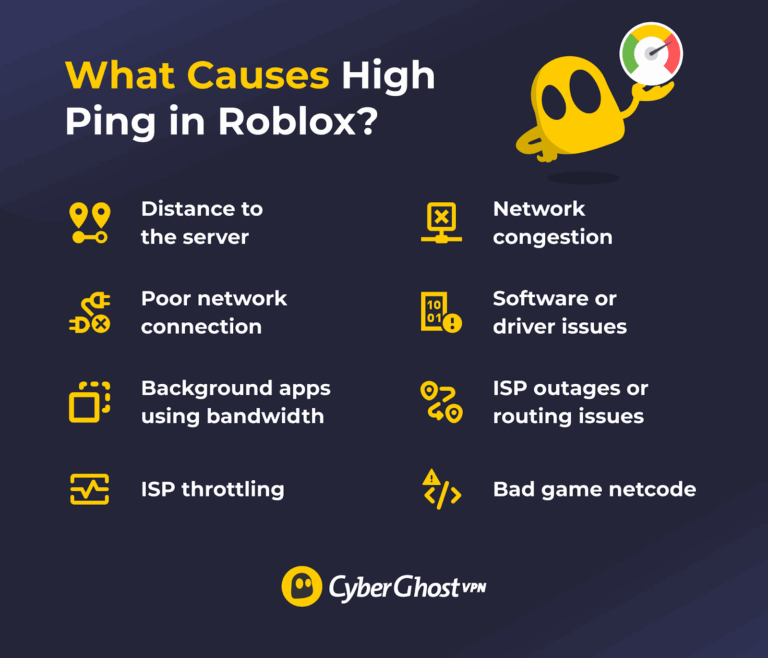
Experiencing a sudden spike in ping can be jarring. Several common culprits often contribute to this immediate frustration. One of the most frequent reasons is network congestion, either on your local network or at your Internet Service Provider's (ISP) end. If multiple devices in your home are streaming 4K video, downloading large files, or running video calls simultaneously, they are all competing for bandwidth, which can starve Roblox of the data it needs.
Another common cause is background applications on your gaming device. Many apps, even when minimized, continue to use internet bandwidth or system resources, impacting Roblox's performance. Additionally, issues with your local Wi-Fi signal, such as interference from other devices or physical obstructions, can cause sudden latency spikes. Sometimes, the problem might even stem from the Roblox server itself, if it is undergoing maintenance or experiencing high traffic. Understanding these immediate triggers is the first step in diagnosing and addressing your high Roblox ping.
How Can I Check My Roblox Ping and Internet Speed?
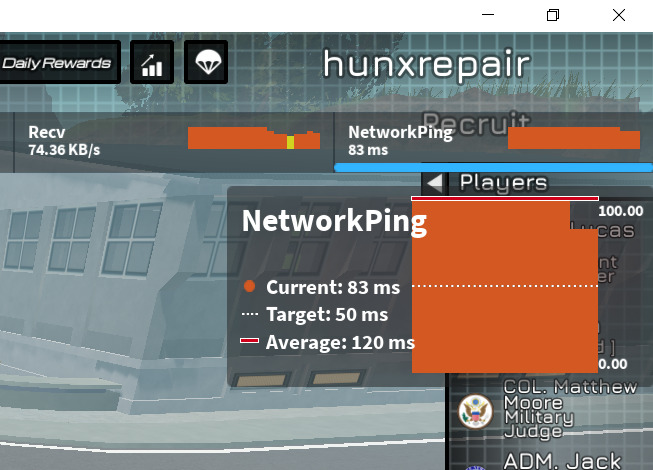
Diagnosing high ping begins with accurately measuring it. While Roblox itself might not always display a precise ping number, there are in-game methods and external tools. Within Roblox, you can often press Shift + F3 (on PC) to bring up a performance overlay, which sometimes shows network statistics, including your ping or latency to the server. For a more direct measure of your overall internet connection, external speed test websites like Speedtest.net or Fast.com are invaluable. These sites will show your download speed, upload speed, and most importantly, your ping to their test servers.
When running these tests, ensure you connect to a server geographically close to you for the most accurate baseline. Also, try to run a test when no other devices on your network are heavily using the internet. If your speed test shows high ping consistently, it indicates a broader internet issue. If the speed test ping is low but Roblox still lags, the problem might be more specific to Roblox's servers or your connection to them.
Is My Internet Connection the Main Culprit Behind High Roblox Ping?
Yes, your internet connection is often the primary suspect when troubleshooting high Roblox ping. The type of connection you have makes a big difference. Fiber optic internet generally offers the lowest latency, followed by cable, while satellite and DSL typically have higher ping due to their technological limitations. Even with a fast connection, factors within your home network can hinder performance.
Wi-Fi connections, while convenient, are inherently less stable and often introduce more latency than a wired Ethernet connection. Wi-Fi signals can be affected by distance from the router, physical barriers (walls, floors), and interference from other wireless devices (cordless phones, microwaves, neighboring Wi-Fi networks). Using an Ethernet cable to connect your PC or console directly to your router eliminates these wireless variables, providing a more stable and lower-ping connection. If you are on mobile, try to get as close to your router as possible or ensure you are on a less congested 5GHz Wi-Fi band if your device and router support it. Upgrading your internet plan might offer faster speeds, but not always lower ping, so focus on connection stability first.
What Router Settings Can Improve My Roblox Ping?
Your router is the gateway to the internet, and optimizing its settings can significantly impact your Roblox ping. First, a simple reboot often works wonders, clearing out temporary glitches and refreshing your connection. Unplug it for 30 seconds, then plug it back in. Next, consider router placement; centrally located and elevated routers tend to provide better Wi-Fi coverage with less interference. Ensure your router's firmware is up to date; manufacturers frequently release updates to improve performance and security.
For more advanced users, Quality of Service (QoS) settings can be a game-changer. QoS allows you to prioritize internet traffic for specific devices or applications, ensuring Roblox gets preferential treatment for bandwidth even when other devices are active. Look for settings like "Game Prioritization" or "Bandwidth Control" in your router's admin panel. If your router has both 2.4GHz and 5GHz Wi-Fi bands, try connecting to the 5GHz band for gaming, as it offers faster speeds and less interference, albeit with a shorter range. Experiment with these settings, restarting your router after changes, to find what works best for your setup.
How Do Background Applications and Downloads Affect Roblox Performance?
Even if your internet connection is blazing fast, background applications and processes can silently consume valuable system resources and bandwidth, leading to a higher Roblox ping. Services like cloud storage (OneDrive, Google Drive), streaming apps (Netflix, Spotify), large game launchers (Steam, Epic Games Store) that are downloading updates, or even web browsers with numerous tabs open can all contribute to latency.
Before launching Roblox, take a moment to close any unnecessary programs. On Windows, open the Task Manager (Ctrl+Shift+Esc) and check the "Processes" and "Performance" tabs. Look for applications consuming significant CPU, memory, or network resources and close them. Disable automatic updates for other games or software while you are playing Roblox. If you are on a mobile device, close apps running in the background. This simple step frees up your device's processing power and ensures Roblox has the dedicated bandwidth it needs for a smoother, lower-ping experience. It is all about giving your game the spotlight it deserves during your valuable playtime.
Can My Device Hardware or Software Cause High Roblox Ping?
While often overlooked, your device's hardware and software configuration can indeed play a role in perceived latency and overall game performance, indirectly affecting your Roblox ping. Outdated network drivers on your PC can lead to inefficient data processing, causing delays. Ensuring your network adapter drivers are current is a crucial step. Similarly, an older or underpowered CPU and insufficient RAM can struggle to process game data quickly, leading to general system lag that can feel like high ping, even if the actual network latency is low.
Keeping your operating system updated also helps, as updates often include network performance improvements and bug fixes. Regularly clearing your device's cache and temporary files can prevent slowdowns. For mobile gamers, ensure your device has sufficient free storage and is not overheating, as both can throttle performance. While these factors might not directly increase the raw ping number, they can contribute to a poorer overall Roblox experience that feels identical to high network latency. Optimizing your device's health ensures it is ready to handle the demands of gaming, making your connection feel more responsive.
Does Roblox Server Location Impact My Ping?
Absolutely, the geographical distance between you and the Roblox server you are connected to has a significant impact on your ping. Data simply takes time to travel, and the further it has to go, the longer that round trip will be. Roblox has servers distributed globally, but you do not always have direct control over which server you connect to for a specific game. Sometimes you might join a game hosted on a server far away, especially if you are joining friends in a different region or if the game creator is in another part of the world.
Unfortunately, Roblox does not offer a built-in server browser that lets you choose your region. However, a VPN (Virtual Private Network) can sometimes help by routing your connection through a server closer to the Roblox game server, effectively shortening the perceived distance. Be cautious, though: using a VPN adds an extra hop to your connection, which can increase ping if you connect to a VPN server that is *further* away. Only use a VPN if you know it has a server strategically located closer to Roblox's game servers for the experience you are playing, or if your ISP is routing your traffic inefficiently. Most of the time, a direct connection is best.
What are Quick Fixes for Temporarily Reducing High Roblox Ping?
When you are in a pinch and need to reduce high Roblox ping quickly, a few straightforward steps can often make an immediate difference. First, perform a quick router reboot. This simple action often resolves minor network hiccups and refreshes your connection. Second, close all unnecessary background applications and browser tabs on your gaming device. This frees up bandwidth and system resources dedicated to Roblox. Use Task Manager on PC or swipe away apps on mobile.
Third, if you are on Wi-Fi, try moving closer to your router or switching to a wired Ethernet connection if possible. Eliminating wireless interference can provide a noticeable improvement. Fourth, ensure no other devices on your home network are performing bandwidth-intensive tasks like large downloads, streaming, or video calls. Politely ask family members to pause these activities for a few minutes. Finally, a quick restart of Roblox itself, or even your entire gaming device, can sometimes clear up temporary software glitches affecting network performance. These quick fixes often provide immediate relief, allowing you to get back into your game with less frustration.
How Can I Maintain Low Ping for Consistent Roblox Gaming?
Achieving consistently low ping for Roblox requires more than just quick fixes; it involves establishing good network habits and optimizing your setup for the long term. Firstly, always prioritize a wired Ethernet connection over Wi-Fi for your primary gaming device, whether it is a PC or console. This provides the most stable and lowest-latency connection possible. Secondly, invest in a reliable, modern router, especially one that supports Wi-Fi 6 (802.11ax) if you must use Wi-Fi, and ensure its firmware is always up to date. Consider a router with QoS features to prioritize game traffic.
Regularly check for and install updates for your operating system and network drivers. Keep your gaming device lean by minimizing unnecessary background applications and performing routine maintenance like clearing caches. Consider your internet plan: while higher speeds do not directly lower ping, a more robust plan can better handle multiple users in your household without impacting gaming performance. Educate your household about bandwidth usage during peak gaming times. Finally, if you consistently face issues, consider contacting your ISP to troubleshoot or inquire about fiber optic options if available in your area. Consistent low ping comes from a combination of optimized hardware, smart software management, and disciplined network usage, ensuring your Roblox adventures are always smooth and enjoyable.
Final Thoughts: Reclaim Your Smooth Roblox Experience
Dealing with high ping in Roblox can turn a fun, social gaming session into a source of pure frustration. But as we have explored, understanding "why is my Roblox ping so high" is the first step toward reclaiming your smooth, lag-free experience. From optimizing your router settings and switching to a wired connection to managing background applications and understanding server locations, there are many practical steps you can take. Remember, balancing gaming with life means making the most of your playtime, and smooth performance is key to that enjoyment. Whether you are building intricate worlds, competing in fast-paced mini-games, or just hanging out with friends, a stable connection enhances every moment. Do not let lag win!
What's your biggest gaming challenge beyond ping? Comment below and share your best tips for maintaining a great connection!
FAQ Section: Your Quick Answers to Roblox Ping Questions
What is a good ping for Roblox?
A good ping for Roblox is generally under 50ms (milliseconds). This ensures your actions register almost instantly, providing a smooth and responsive gameplay experience. Pings between 50-100ms are acceptable, but anything consistently above 100ms will likely cause noticeable lag and frustration during gameplay.
Does WiFi cause high ping in Roblox?
WiFi can often contribute to higher ping in Roblox compared to a wired connection. Wireless signals are susceptible to interference, distance from the router, and physical obstructions, all of which can increase latency and cause unstable connections, leading to a less reliable ping for gaming.
How can I test my Roblox ping accurately?
You can test your Roblox ping by pressing Shift + F3 in-game (on PC) to access the developer console, which sometimes displays network stats including ping. For a general internet ping test, use websites like Speedtest.net, choosing a server geographically close to you. This gives a good baseline of your network's latency.
Can a VPN help lower Roblox ping?
A VPN can sometimes lower Roblox ping if your internet service provider (ISP) is routing your traffic inefficiently or if the VPN server is geographically closer to the Roblox game server you are trying to connect to than your direct route. However, a VPN also adds an extra hop, which can increase ping if not used strategically.
Should I close background apps to improve Roblox ping?
Yes, closing unnecessary background applications and browser tabs is highly recommended to improve Roblox ping. These programs consume valuable internet bandwidth and system resources, which can lead to higher latency and reduced game performance. Freeing up these resources ensures Roblox has dedicated access.
Does clearing Roblox cache help with ping?
Clearing Roblox cache primarily helps with game loading times and resolving graphical glitches, rather than directly lowering ping. However, a cluttered or corrupted cache can sometimes indirectly contribute to overall system slowdowns that might feel like lag, so it is a good maintenance step.
What role does my ISP play in high Roblox ping?
Your ISP (Internet Service Provider) plays a crucial role. The quality of their infrastructure, the type of connection (fiber, cable, DSL), and how they route your internet traffic significantly impact your baseline ping. A congested ISP network or poor routing can lead to persistently high ping, even with a fast plan. Contacting them for line diagnostics might be necessary.
Diagnose internet issues, Optimize network settings, Improve device performance, Understand Roblox server impact, Reduce background activity, Use wired connections, Update drivers, Clear cache, Router placement tips, VPN considerations for ping, Check Roblox server status, Upgrade internet plan, Prioritize game traffic.
35


Why Is My Ping So High In Roblox Nerd Techy Why Is My Ping So High In Roblox . Ultimate Guide To Fix Fix Roblox High Ping Lag Spikes Roblox High Ping Thumbnail . How To Fix High Ping On Roblox FIX LAG 2024 YouTube . Playing Roblox With Very High Ping YouTube Hqdefault . Best Methods To Lower Ping On Roblox High Ping Fix YouTube


High Ping In Roblox Lets Fix It 1750736006 Ping Cao Roblox . High Ping In Roblox Lets Fix It . Roblox Ping Fix . How To Fix High Ping In Roblox 2022 Lower Ping In Roblox YouTube . How To Fix High Ping In Roblox 2021 YouTube


Bye Bye Lag Fix High Ping On Roblox . Why Is My Ping So High In Roblox Answered Gamer Tweak Roblox High Ping. Roblox Hone Blog How To Lower Ping In Roblox Fix High Ping Quickly . High Roblox Ping Lets Fix It . How To Fix High Ping In Roblox Once For Good Expert Guide Why Is My Ping So High In Roblox
FPS Boost In Roblox How ExitLag Improves Performance 2026 View Result Ping For Game Roblox 1024x568 . Severe Wifi Slowdowns While Playing On Windows 10 And Possibly 11 . How To Fix High Ping In Roblox Best Solutions And Boosters. Fix Roblox Ping And Lag Fast GuideBros Fix Roblox Ping And Connection Issues . How To Lower Ping In Roblox The Ultimate Guide CyberGhost VPN Image 7 768x658


Fix Roblox Ping And Connection Issues Complete Steps Fix Roblox Ping And Connection Issues . Check Your Roblox Ping A Simple Guide . Bye Bye Lag Fix High Ping On Roblox . Unusually High Ping On Roblox Only Engine Bugs Developer Forum Roblox . Check Your Roblox Ping A Simple Guide



Why Am I Getting High Ping On Roblox Causes Solutions Explained. How To Fix High Ping In Roblox Why Is My Ping So High In Roblox But . Why Is My Roblox Ping So High What Causes Lag Why Is My Ping So High.webp. 7 Ways To Fix High Ping And Lagging Issues In Valorant Guiding Tech Why Is My Ping So High In Valorant . How To Lower Ping In Games 12 Easy Fixes Why Is My Ping So High Infographic 570x223


How To Lower Ping In Roblox 2024 Fix HIGH Ping In Roblox Full Guide. So My Ping Was Higher Than Your S WhiteGX Roblox Fandom 755. Why My Game Ping Its So High How Do I Optimize It Game Design 2 1035x390 . Fixed Roblox Lag And High Ping To Speed Up Game Fixed Roblox Lag And High Ping To Speed Up Game . Roblox High Ping Fix Roblox Ping Reducer IJUJ